
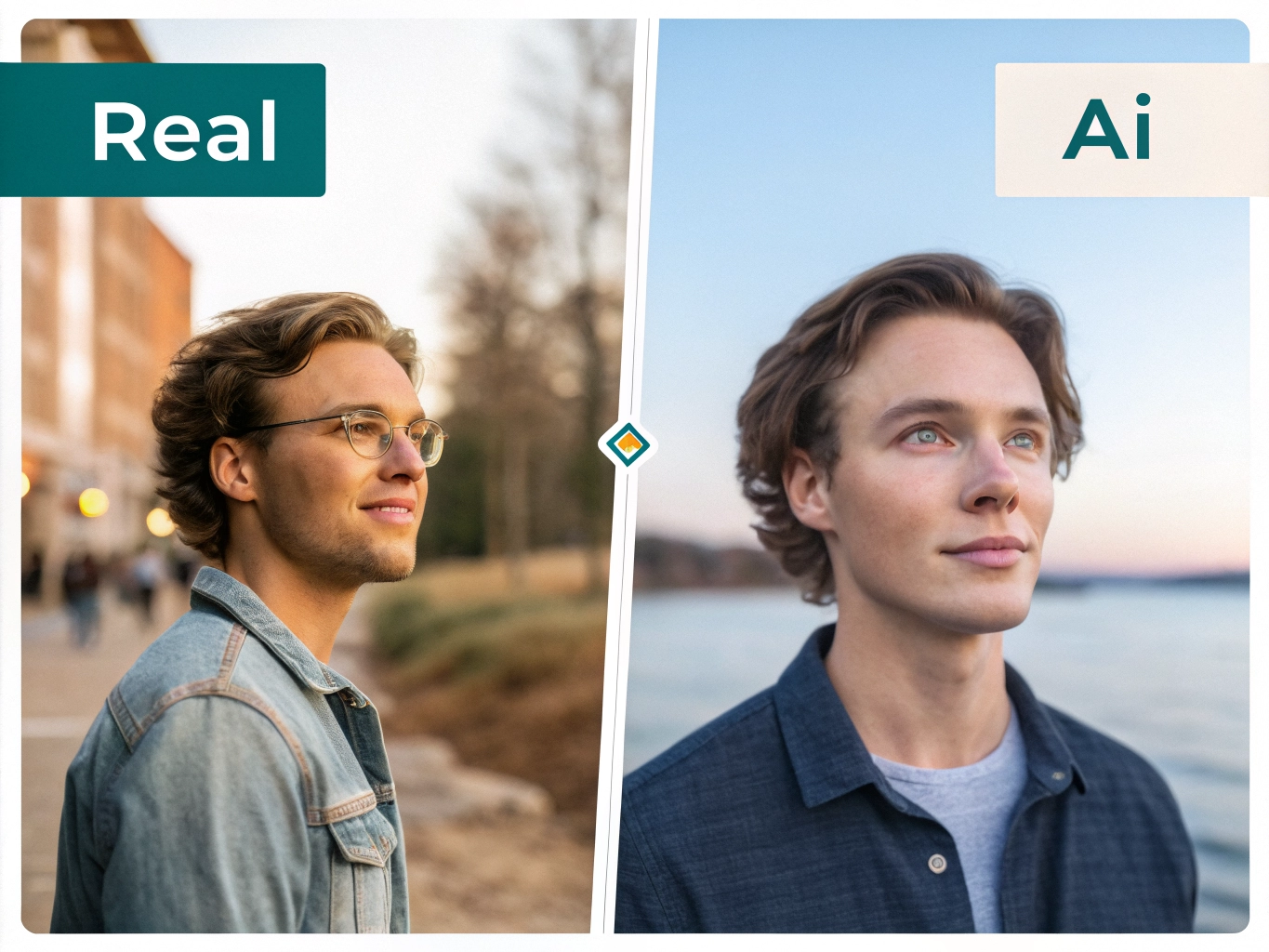
AI Generated Photo Real Ya Fake Kaise Pahchanein? 15 Easy Tarike | AI Photo Ko Identify Karne Ki Complete Guide
Aaj ke time mein AI Generated Photos itni realistic ho gayi hain ki kai baar real aur fake image ke beech difference samajhna difficult ho jata hai. AI tools ki help se kisi person ki realistic photo banana, background change karna, face modify karna aur completely imaginary image create karna possible hai.
Social media par aapne bhi aisi photos dekhi hongi jo dekhne mein bilkul real lagti hain, lekin actually woh AI Generated Image hoti hain.
Isliye ye samajhna important hai ki AI generated photo real ya fake kaise pahchanein.
Is article mein hum simple language mein 15 practical methods dekhenge jinki help se aap AI-generated images ko identify karne ki koshish kar sakte hain.
AI Generated Photo Kya Hoti Hai?
AI Generated Photo ek aisi image hoti hai jo Artificial Intelligence tools ki help se create ya modify ki jaati hai.
AI kisi existing photograph ko edit kar sakta hai ya bina kisi real photograph ke ek completely new image generate kar sakta hai.
Example:
- AI se realistic human face banana
- Background change karna
- Kapde change karna
- Kisi person ko different location par dikhana
- Old photo ko enhance karna
- Fake product image banana
- AI se celebrity-style image create karna
Har AI-generated image fake information nahi hoti. Kuch images sirf creative purposes ke liye banayi jaati hain.
Problem tab hoti hai jab AI-generated image ko real photograph batakar share kiya jata hai.
AI Generated Photo Real Ya Fake Kaise Pahchanein?
AI image ko identify karne ke liye ek single method par depend nahi karna chahiye.
Instead, image ko different angles se check karein.
1. Face Ko Carefully Check Karein
AI-generated images mein face generally realistic dikhta hai, lekin close observation par unusual details mil sakti hain.
Check karein:
- Eyes same direction mein hain ya nahi
- Eyebrows natural hain ya nahi
- Teeth unusual hain ya nahi
- Skin bahut perfect lag rahi hai ya nahi
- Face ke edges natural hain ya nahi
- Earrings ya accessories properly connected hain ya nahi
Kabhi-kabhi AI face ko realistic banata hai, lekin small details mein mistake reh jaati hai.
2. Hands Aur Fingers Check Karein
Hands aur fingers AI-generated images ka common problem area rahe hain.
Photo mein hands ko zoom karke dekhein.
Check karein:
- Fingers ki count
- Fingers ka shape
- Fingers ki length
- Nails
- Hands ka object ke saath interaction
Agar fingers unusual shape mein hain ya hand anatomy natural nahi lag rahi, to image AI-generated ho sakti hai.
Lekin sirf fingers ke basis par final conclusion nahi lena chahiye, kyunki modern AI models is area mein kaafi improve ho chuke hain.
3. Text Aur Letters Ko Zoom Karein
AI-generated images mein text ek important clue ho sakta hai.
Example:
Agar photo mein shop ka board, T-shirt, newspaper, poster ya road sign hai, to uske text ko zoom karke dekhein.
AI-generated image mein kabhi-kabhi:
- Letters distorted hote hain
- Words meaningless hote hain
- Spelling strange hoti hai
- Text readable nahi hota
- Letters ek dusre mein merge hote hain
Agar image mein text clearly abnormal hai, to AI generation ka possibility ho sakta hai.
4. Background Ko Dhyan Se Dekhein
Sirf person ko check karna enough nahi hai.
Background bhi inspect karein.
Example:
- Buildings ka shape unusual hai
- Windows properly aligned nahi hain
- Objects randomly placed hain
- People ke faces distorted hain
- Road signs strange hain
- Shadows inconsistent hain
AI kabhi-kabhi main subject ko bahut realistic bana deta hai, lekin background mein small mistakes reh sakti hain.
5. Shadows Aur Lighting Check Karein
Real photographs mein light aur shadow generally ek consistent direction follow karte hain.
Image ko check karein:
Light kis direction se aa rahi hai?
Aur:
Shadow kis direction mein ja rahi hai?
Agar person par light left side se aa rahi hai, lekin object ki shadow opposite lighting ko suggest kar rahi hai, to image suspicious ho sakti hai.
6. Reflections Check Karein
Mirrors, glass, water aur shiny surfaces AI images ko identify karne mein helpful ho sakte hain.
Example:
Agar person mirror ke saamne khada hai, to reflection ko check karein.
Reflection:
- Same position mein hai?
- Same clothes hain?
- Face properly match kar raha hai?
- Hands correct position mein hain?
Agar reflection aur original subject match nahi kar rahe, image edited ya AI-generated ho sakti hai.
7. Image Ko Reverse Search Karein
Agar aapko photo suspicious lagti hai, to reverse image search useful ho sakta hai.
Iska purpose ye check karna hai ki same image internet par pehle kahin publish hui hai ya nahi.
Aap image ka search karke dekh sakte hain:
- Original source kya hai?
- Photo kab publish hui?
- Kis website par available hai?
- Kya image ka different version available hai?
Agar viral photo kisi old event ki nikle, to uski actual context samajhne mein help mil sakti hai.
8. AI Image Detection Tools Ka Use Karein
Kuch online tools images ko analyze karke estimate karne ki koshish karte hain ki image AI-generated ho sakti hai ya nahi.
Lekin yahan ek important point hai:
AI detector ka result 100% proof nahi hota.
Different detectors different results de sakte hain.
Isliye detector ko sirf ek additional clue ki tarah use karein.
Final conclusion ke liye:
Visual clues + source verification + reverse search + metadata ko combine karna better approach hai.
9. Image Metadata Check Karein
Digital photos mein kabhi-kabhi metadata available hota hai.
Metadata mein information ho sakti hai:
- Camera model
- Date
- Software
- Image dimensions
- Editing information
Agar metadata mein kisi editing software ya AI-related tool ka indication milta hai, to ye useful clue ho sakta hai.
Lekin metadata missing hone ka matlab automatically ye nahi hai ki image fake hai.
Social media platforms frequently image metadata remove ya modify kar sakte hain.
10. Image Ki Quality Check Karein
AI-generated image mein kabhi-kabhi kuch areas unusually smooth ya overly perfect ho sakte hain.
For example:
- Skin unnaturally smooth
- Hair strands strange
- Clothes texture inconsistent
- Background too perfect
- Objects melted-looking
Lekin modern AI images ki quality bahut improve ho chuki hai.
Isliye “photo bahut perfect hai = AI” wala rule use nahi karna chahiye.
11. Objects Ke Connection Ko Check Karein
Image mein objects ek dusre ke saath naturally connected hain ya nahi, ye dekhein.
Example:
Person ke haath mein mobile hai.
Check karein:
- Mobile properly hold ho raha hai?
- Fingers phone ke around natural hain?
- Phone ka perspective correct hai?
- Person ki body aur phone ka angle realistic hai?
Isi tarah glasses, bags, watches, jewellery aur other accessories ko bhi check karein.
12. Perspective Aur Proportion Check Karein
Real-world objects ka size aur perspective generally logical hota hai.
AI image mein kabhi-kabhi:
- Ek person unusually tall lag sakta hai
- Door ka size strange ho sakta hai
- Car ka wheel proportion incorrect ho sakta hai
- Objects ka distance unrealistic lag sakta hai
Image ko overall scene ke perspective ke saath compare karein.
13. Photo Ka Source Check Karein
Agar image WhatsApp, Instagram, Facebook ya kisi website se mili hai, to sirf image dekhkar believe na karein.
Source check karein:
Image kisne post ki?
Original source kya hai?
Kya reliable news organization ya official account ne bhi ise publish kiya hai?
Agar image sirf random account se viral ho rahi hai aur koi reliable source nahi mil raha, to extra verification karna better hai.
14. Viral Claim Ko Separately Verify Karein
Kabhi-kabhi image real hoti hai, lekin uske saath diya gaya claim fake hota hai.
Example:
Ek real flood photo ko kisi completely different country ya event ke naam se share kiya ja sakta hai.
Isliye do cheezein separately verify karein:
Photo real hai?
Photo ke saath diya gaya information real hai?
Dono same cheez nahi hain.
15. Multiple Clues Ko Combine Karein
AI-generated photo identify karne ka sabse important rule hai:
Sirf ek clue ke basis par decision na lein.
Agar:
- Hands unusual hain
- Text distorted hai
- Background strange hai
- Shadows inconsistent hain
- Source unclear hai
to image suspicious ho sakti hai.
Lekin agar sirf ek small detail strange hai, to us basis par image ko fake declare nahi karna chahiye.
AI Photo Check Karne Ka Simple Flow Chart
        📷 Photo Mile
             ↓
     Photo Ko Carefully Dekhein
             ↓
    Face + Hands + Text Check Karein
             ↓
     Background & Shadows Check
             ↓
       Source Verify Karein
             ↓
       Reverse Image Search
             ↓
     Metadata / AI Detector Check
             ↓
     Multiple Clues Compare Karein
             ↓
   ┌─────────┴─────────┐
   ↓                   ↓
Strong Evidence     Evidence Clear Nahi
   ↓                   ↓
Further Verify      "Unverified" Rakhein
   ↓
Share Karne Se Pehle Confirm Karein
AI Generated Photo Aur Real Photo Mein Difference
| Feature | Real Photo | AI Generated Photo |
|---|---|---|
| Hands | Usually natural | Kabhi unusual ho sakte hain |
| Text | Generally readable | Distorted ho sakta hai |
| Background | Consistent | Small inconsistencies ho sakti hain |
| Shadows | Light source ke according | Kabhi inconsistent |
| Reflections | Usually logical | Kabhi mismatch |
| Objects | Natural proportions | Kabhi strange proportions |
| Metadata | Camera information ho sakti hai | Tool/editing information possible |
| Source | Original source traceable ho sakta hai | Source unclear ho sakta hai |
Important: Ye differences guaranteed rules nahi hain. Modern AI-generated images inmein se kai problems ko avoid kar sakti hain.
AI Generated Photo Ko Share Karne Se Pehle Kya Karein?
Agar koi shocking ya viral photo milti hai, to turant forward karne ke bajay ye steps follow karein:
Step 1
Photo ko zoom karke dekhein.
Step 2
Face, hands, text aur background check karein.
Step 3
Photo ka original source search karein.
Step 4
Reverse image search karein.
Step 5
Claim ko reliable sources se verify karein.
Step 6
Agar confirmation nahi milti, to photo ko unverified samjhein.
AI Generated Photos Se Kya Risk Hai?
AI-generated photos sirf entertainment ke liye nahi hoti. Inka misuse bhi ho sakta hai.
Possible risks:
- Fake news
- Online scams
- Fake profiles
- Identity misuse
- Fake product advertisements
- Misleading social media posts
- Reputation damage
Isliye internet par milne wali har realistic photo ko automatically genuine nahi samajhna chahiye.
Kya AI Detector 100% Accurate Hota Hai?
Nahi.
AI detection technology continuously improve ho rahi hai, lekin AI detector ko final proof nahi maana jana chahiye.
AI-generated images ko edit, resize, compress ya screenshot karne ke baad detection aur difficult ho sakta hai.
Isliye best approach hai:
AI Detector + Visual Inspection + Source Verification + Reverse Search
AI Photo Identify Karne Ka Golden Rule
Internet par kisi image ko verify karte waqt ye simple rule yaad rakhein:
“Jo photo real dikhe, zaroori nahi ki woh real ho.”
Aur doosra important rule:
“Ek clue nahi, multiple clues check karein.”
Frequently Asked Questions (FAQs)
AI generated photo kya hoti hai?
AI generated photo ek digital image hoti hai jo Artificial Intelligence technology ki help se create ya modify ki jaati hai.
AI generated photo ko kaise pahchanein?
Face, hands, fingers, text, background, shadows, reflections aur image source ko carefully check karein. Reverse image search aur AI detection tools bhi additional verification ke liye use kiye ja sakte hain.
Kya AI generated photos real jaisi hoti hain?
Haan. Modern AI tools highly realistic images generate kar sakte hain, isliye sirf image dekhkar identify karna difficult ho sakta hai.
Kya AI detector 100% accurate hai?
Nahi. AI detectors estimates provide karte hain. Unke result ko other verification methods ke saath use karna better hai.
Kya reverse image search AI photo ko identify kar sakta hai?
Reverse image search image ke previous online appearances aur sources identify karne mein help kar sakta hai, lekin ye har AI-generated image ko automatically identify nahi karta.
Kya metadata se AI photo identify ho sakti hai?
Kabhi-kabhi metadata useful clue de sakta hai, lekin metadata missing hone ya change hone ki wajah se ise final proof nahi maana ja sakta.
Conclusion
AI Generated Photo Real Ya Fake Kaise Pahchanein ye samajhna aaj ke digital world mein increasingly important ho raha hai.
AI technology ki wajah se realistic images banana easier ho gaya hai. Isliye social media par koi photo real-looking ho, to use immediately genuine maan lena safe approach nahi hai.
Photo ko carefully inspect karein, face, hands, text, background, shadows aur reflections check karein. Uske baad source verify karein aur zarurat padne par reverse image search ya AI detection tools ka use karein.
Sabse important baat hai ki bina verify kiye suspicious image ko forward ya share na karein.
Digital world mein ek simple habit rakhein:
Pause → Check → Verify → Then Share.


Good very helpful
Hello